Implementation of CloudWatch and CloudTrail for IdeaForge by Galaxy Office Automation Pvt Ltd
Galaxy Office Automation Pvt Ltd, a leading IT solutions provider known for delivering cutting-edge technology solutions, embarked on a pivotal project for IdeaForge . IdeaForge is the pioneer and the pre-eminent market leader in the Indian unmanned aircraft systems (“UAS”) market. We had the largest operational deployment of indigenous UAVs across India The objective was to implement AWS CloudWatch for monitoring and AWS CloudTrail for logging to improve system performance, security, and operational efficiency of webapplication and servers of IdeaForge Pvt Ltd.
About the Customer
Client: IdeaForge Pvt Ltd.
Industry: Designs and manufactures drones for mapping, security, and surveillance applications.
AWS Services Used: AWS CloudWatch, AWS CloudTrail, AWS Lambda, AWS SNS, AWS EventBridge
Challenges: IdeaForge Pvt Ltd. Designs drones and surveillance that requires real-time monitoring and comprehensive logging to ensure high availability, security, and performance.

About the Customer
Client: ideaForge
Industry: Designing and manufacturing drones for mapping, security, and surveillance applications
AWS Services Used: AWS CloudWatch, AWS CloudTrail, AWS Lambda, AWS SNS, AWS EventBridge
Challenges: ideaForge required real-time monitoring and comprehensive logging to ensure high availability, security, and performance


Objectives
The previous infrastructure lacks comprehensive monitoring and logging capabilities, resulting in difficulties in tracking application performance, identifying security issues, and maintaining compliance, delayed Incident Response, Manual Monitoring, Limited Insight into Changes, Difficulty Diagnosing Performance Issues.
Enhance Monitoring
Implement AWS CloudWatch to provide real-time monitoring of the infrastructure and applications.
Improve Logging
Implement AWS CloudTrail to log all API activities and track user actions for security and compliance.
Optimize Performance
Use the insights from monitoring and logging to optimize the performance of the infrastructure and applications.
Ensure Security
Enhance the security posture by tracking and analysing access and activity logs.
Facilitate Troubleshooting
Enable faster and more efficient troubleshooting by providing detailed logs and metrics.

Objectives
The previous infrastructure lacked comprehensive monitoring and logging capabilities, resulting in difficulties in tracking application performance, identifying security issues, and maintaining compliance. This led to delayed incident response, manual monitoring, limited insight into changes, and difficulty diagnosing performance issues.
Enhance Monitoring
Implement AWS CloudWatch to provide real-time monitoring of the infrastructure and applications.
Improve Logging
Implement AWS CloudTrail to log all API activities and track user actions for security and compliance.
Optimize Performance
Use the insights from monitoring and logging to optimize the performance of the infrastructure and applications.
Ensure Security
Enhance the security posture by tracking and analysing access and activity logs.
Facilitate Troubleshooting
Enable faster and more efficient troubleshooting by providing detailed logs and metrics.
Our Solution
AWS CloudWatch Implementation
Real-time Monitoring
- We have set up CloudWatch dashboards to visualize system performance metrics.
- Configured CloudWatch Alarms to notify the operations team of any anomalies or threshold breaches.
Custom Metrics
- We have created custom CloudWatch metrics for specific application parameters.
- Integrated CloudWatch with existing applications to push custom logs and metrics.
Logs and Metrics Analysis
- We have utilized CloudWatch Logs to aggregate, monitor, and store log files from various sources.
- We implemented CloudWatch Log Insights for querying and analysing log data.


Customer Example
CloudWatch Alarms for IdeaForge
To enhance infrastructure monitoring and ensure proactive management of the IdeaForge account, we have implemented a comprehensive set of AWS CloudWatch alarms. These alarms are designed to alert the team to critical changes in various metrics, helping to maintain optimal performance and quickly address any issues.
Instance Health and Performance
CPU Utilization
Alarms were configured with thresholds at different levels for various servers: one alarm was set to trigger at greater than 90%, another at greater than 80%, and a third at 50%. This tiered approach allows for proactive management of server load and helps prevent potential performance degradation.
Memory utilization
Alarms were established with thresholds at greater than 90% and greater than 80%. These alarms enable timely identification and resolution of memory-related issues, ensuring smooth operation of applications and services.
Disk Space Utilization
Root disk utilization alarms were set with thresholds at greater than 90% and greater than 80%. This ensures that disk usage is kept in check, preventing storage-related disruptions.
Web Services Health
Additionally, alarms for HTTP errors were configured to monitor the health of web services. An alarm was set for 4XX errors with a threshold of 50 errors, and another for 5XX errors with a threshold of 10 errors. These alarms help quickly identify and address client-side and server-side issues, respectively.
Metrics Monitoring Using AWS CloudWatch Agent
- Galaxy has utilized the AWS CloudWatch Agent to gather custom system-level metrics, including memory utilization, disk I/O, and network statistics from the instance in IdeaForge account.
- The agent continuously collects metrics from the system or application, sending these metrics to AWS CloudWatch at specified intervals (10 seconds).
- Galaxy Office Automation used the AWS CloudWatch Agent wizard to generate the configuration file.
- In IdeaForge account, Galaxy Office Automation has set up log groups to capture access logs and error logs.
- Galaxy can gain detailed insights into system behaviour, user access patterns, and application performance. This helps in identifying potential issues and optimizing system performance.
- Error logs provide critical information on system failures or application errors, enabling faster diagnosis and resolution of issues. This minimizes downtime and ensures smoother operations.

Metrics Monitoring Using AWS CloudWatch Agent
- Galaxy utilized the AWS CloudWatch Agent to gather custom system-level metrics, including memory utilization, disk I/O, and network statistics from the instance in the ideaForge account.
- The agent continuously collects metrics from the system or application, sending these metrics to AWS CloudWatch at specified intervals (10 seconds).
- Galaxy used the AWS CloudWatch Agent wizard to generate the configuration file.
- In the ideaForge account, Galaxy has set up log groups to capture access logs and error logs.
- Galaxy can gain detailed insights into system behavior, user access patterns, and application performance. This helps in identifying potential issues and optimizing system performance.
- Error logs provide critical information on system failures or application errors, enabling faster diagnosis and resolution of issues. This minimizes downtime and ensures smoother operations.


AWS CloudTrail Implementation
API Activity Logging
- Enabled CloudTrail across all AWS accounts to log API calls: We implemented CloudTrail across all AWS accounts to comprehensively record all API activity.
- We have configured CloudTrail to capture details about API requests: CloudTrail is configured to capture granular details about API requests, including the source IP address, timestamp, and request parameters.
-
Security and Compliance
- We have set up CloudTrail logs to monitor for security threats and compliance breaches: CloudTrail logs are continuously monitored to detect potential security threats and ensure compliance with relevant regulations.
- We integrated CloudTrail with AWS Config to track resource configurations and changes: CloudTrail is integrated with AWS Config to provide a comprehensive view of resource configurations and track any changes made.
-
Centralized Logging
- We have aggregated CloudTrail logs in a centralized S3 bucket for easy access and long-term storage: CloudTrail logs are aggregated within a centralized S3 bucket for efficient access and long-term archival purposes.
- Enabled log file validation to ensure the integrity and authenticity of log files: Log file validation is enabled to guarantee the integrity and authenticity of CloudTrail logs.
-
Analysis and Alerting
- We have used AWS Lambda to process CloudTrail logs and trigger alerts based on specific events: AWS Lambda functions are utilized to process CloudTrail logs and trigger automated alerts based on predefined security events.
- We have integrated CloudTrail with AWS SNS to notify the security team of any suspicious activities: CloudTrail is integrated with AWS SNS to deliver real-time notifications to the security team regarding any suspicious activities identified in the logs.
-

AWS CloudTrail Implementation
API Activity Logging
- We implemented CloudTrail across all AWS accounts to comprehensively record all API activity.
- CloudTrail is configured to capture granular details about API requests, including the source IP address, timestamp, and request parameters.
Security and Compliance
- CloudTrail logs are continuously monitored to detect potential security threats and ensure compliance with relevant regulations.
- CloudTrail is integrated with AWS Config to provide a comprehensive view of resource configurations and track any changes made.
Centralized Logging
- CloudTrail logs are aggregated within a centralized S3 bucket for efficient access and long-term archival purposes.
- Log file validation is enabled to guarantee the integrity and authenticity of CloudTrail logs.
Analysis and Alerting
- AWS Lambda functions are utilized to process CloudTrail logs and trigger automated alerts based on predefined security events.
- CloudTrail is integrated with AWS SNS to deliver real-time notifications to the security team regarding any suspicious activities identified in the logs.
Customer Example: IdeaForge Pvt Ltd
EC2 Instance State Change Notification Automation using AWS CloudTrail API
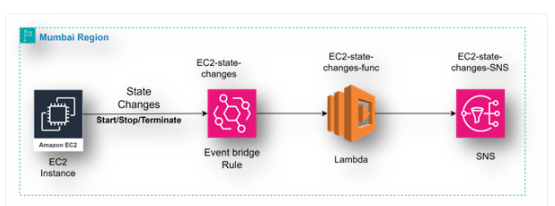
We have implemented a sophisticated automation solution using Amazon EventBridge, AWS Lambda, and Amazon SNS. This setup ensures that any changes in the state of EC2 instances such as starting, stopping, or terminating—are promptly communicated to the relevant stakeholders via email.
EventBridge Configuration
- We have set up Amazon EventBridge (formerly known as CloudWatch Events) to monitor API calls made to AWS CloudTrail. This enables us to capture detailed events related to EC2 instance state changes.
- Specifically, EventBridge rules are configured to listen for EC2 state transition events, such as when an instance is started, stopped, or terminated.
-
AWS CloudTrail Integration
- AWS CloudTrail captures API activity across the AWS environment, including actions related to EC2 instances. CloudTrail logs are used as the event source for EventBridge, providing detailed context about the state changes.
Lambda Function
- When EventBridge detects an EC2 state change event, it triggers an AWS Lambda function. This Lambda function processes the event data, extracting key details such as the instance ID, previous state, and new state.
- The function then formats this information into a structured message suitable for notification.
Amazon SNS Notification
- The Lambda function publishes the formatted message to an Amazon SNS topic.
SNS is used to send notifications via email to a predefined list of recipients.
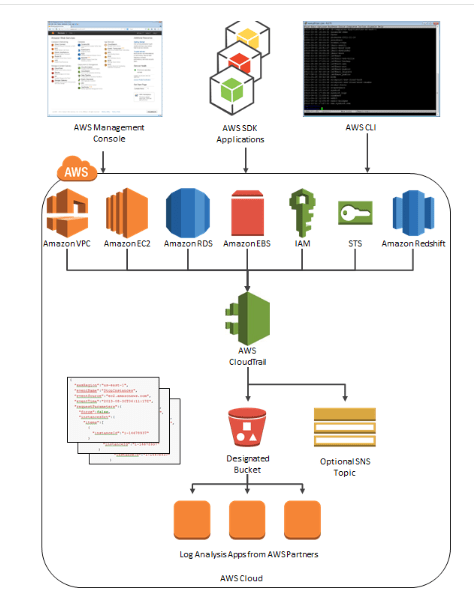
AWS CloudTrail Process Flow Diagram
Customer Example
EC2 Instance State Change Notification Automation using AWS CloudTrail API
We have implemented a sophisticated automation solution using Amazon EventBridge, AWS Lambda, and Amazon SNS. This setup ensures that any changes in the state of EC2 instances such as starting, stopping, or terminating—are promptly communicated to the relevant stakeholders via email.
EventBridge Configuration
- We have set up Amazon EventBridge (formerly known as CloudWatch Events) to monitor API calls made to AWS CloudTrail. This enables us to capture detailed events related to EC2 instance state changes.
- Specifically, EventBridge rules are configured to listen for EC2 state transition events, such as when an instance is started, stopped, or terminated.
AWS CloudTrail Integration
- AWS CloudTrail captures API activity across the AWS environment, including actions related to EC2 instances. CloudTrail logs are used as the event source for EventBridge, providing detailed context about the state changes.
Lambda Function
- When EventBridge detects an EC2 state change event, it triggers an AWS Lambda function. This Lambda function processes the event data, extracting key details such as the instance ID, previous state, and new state.
- The function then formats this information into a structured message suitable for notification.
Amazon SNS Notification
- The Lambda function publishes the formatted message to an Amazon SNS topic.
- SNS is used to send notifications via email to a predefined list of recipients.
AWS CloudTrail Process Flow Diagram
Success Metrics
Performance Optimization
- Reduced Downtime: Real-time monitoring and alerts reduced system downtime by 40%.
- Improved Performance: Insights from custom metrics and logs helped in optimizing application performance, resulting in a 30% improvement in response times.
Enhanced Security
- Improved Threat Detection: Continuous monitoring of API activities and access logs improved threat detection and response time.
- Compliance: Ensured compliance with industry standards by maintaining detailed logs of all activities.
Operational Efficiency
- Faster Troubleshooting: Detailed logs and real-time monitoring facilitated faster identification and resolution of issues, reducing troubleshooting time by 50%.
- Scalability: The scalable nature of CloudWatch and CloudTrail allowed IN10 Media BCCI to handle increased traffic and expand its infrastructure seamlessly.
- Reduction in Manual Monitoring Effort: Manual monitoring efforts have been reduced by 75%, as automated notifications provide immediate awareness of EC2 state changes.
Increased Notification Accuracy:
- Number of EC2 State Change Events Captured: 100% of EC2 state change events (start, stop, terminate) are accurately captured by EventBridge.
Success Metrics
Performance Optimization
- 40% reduction in system downtime was achieved through real-time monitoring and alerts.
- 30% improvement in response times resulted from insights gained through custom metrics and logs, which were used to optimize application performance.
Enhanced Security
- Improved threat detection and response time were achieved through continuous monitoring of API activities and access logs.
- Compliance with industry standards is ensured by maintaining detailed logs of all activities.
Operational Efficiency
- 50% reduction in troubleshooting time was achieved through detailed logs and real-time monitoring, facilitating faster identification and resolution of issues.
- The scalable nature of CloudWatch and CloudTrail allowed IN10 Media BCCI to handle increased traffic and expand its infrastructure seamlessly.
- 75% of manual monitoring efforts have been reduced, as automated notifications provide immediate awareness of EC2 state changes.
- 100% of EC2 state change events (start, stop, terminate) are accurately captured by EventBridge.
The implementation of AWS CloudWatch and CloudTrail by Galaxy Office Automation for IdeaForge has greatly improved system monitoring, security, and operational efficiency. Real-time metrics, custom logs, and automated alerts now ensure high availability and optimal performance for IdeaForge’s drone systems. Enhanced threat detection and compliance, coupled with reduced downtime and faster troubleshooting, showcase the effectiveness of these AWS solutions in maintaining robust IT infrastructures. This project highlights the value of comprehensive monitoring and logging in achieving superior system performance and security.
The implementation of AWS CloudWatch and CloudTrail by Galaxy for ideaForge has greatly improved system monitoring, security, and operational efficiency. Real-time metrics, custom logs, and automated alerts now ensure high availability and optimal performance for ideaForge’s drone systems. Enhanced threat detection and compliance, coupled with reduced downtime and faster troubleshooting, showcase the effectiveness of these AWS solutions in maintaining robust IT infrastructures. This project highlights the value of comprehensive monitoring and logging in achieving superior system performance and security.
To know more about the solution
Contact Us