Galaxy Office Automation

Implementation of Cloudwatch and Cloudtrail for Monitoring and Logging

About the Company

Implementation of Cloudwatch and Cloudtrail for Monitoring and Logging

Challenges: IN10 Media BCCI operates a dynamic news platform that requires real-time monitoring and comprehensive logging to ensure high availability, security, and performance.

The previous infrastructure lacks comprehensive monitoring and logging capabilities, resulting in difficulties in tracking application performance, identifying security issues, and maintaining compliance, delayed Incident Response, Manual Monitoring, Limited Insight into Changes, Difficulty Diagnosing Performance Issues.

Objectives

1.Enhance Monitoring: Implement AWS CloudWatch to provide real-time monitoring of the infrastructure and applications.

2.Improve Logging: Implement AWS CloudTrail to log all API activities and track user actions for security and compliance.

3.Optimize Performance: Use the insights from monitoring and logging to optimize the performance of the infrastructure and applications.

4.Ensure Security: Enhance the security posture by tracking and analysing access and activity logs.

5.Facilitate Troubleshooting: Enable faster and more efficient troubleshooting by providing detailed logs and metrics.

Data Migration

Optimizing the migration process to minimize downtime and ensure data integrity while transferring large volumes of data (100 GB) securely and efficiently from on-premises servers to AWS.

Network Integration

Configuring and managing a robust network infrastructure to
establish secure and reliable connections between on-premises data centers and AWS infrastructure, ensuring minimal latency and maximum uptime.

Scalability

Designing and implementing a scalable storage architecture that can seamlessly accommodate the expected growth of data volumes into terabytes, while ensuring high availability and performance

Performance

 Maintaining high data availability and performance consistency across distributed networks

AWS CloudWatch Implementation

1.Real-Time Monitoring:
• We have set up CloudWatch dashboards to visualize system performance metrics.
• Configured CloudWatch Alarms to notify the operations team of any anomalies or threshold breaches.

2.Custom Metrics:
• We have created custom CloudWatch metrics for specific application parameters.
• Integrated CloudWatch with existing applications to push custom logs and metrics.

3.Logs and Metrics Analysis:
• We have utilized CloudWatch Logs to aggregate, monitor, and store log files from various sources.
• We implemented CloudWatch Log Insights for querying and analysing log data.

Data Migration

Optimizing the migration process to minimize downtime and ensure data integrity while transferring large volumes of data (100 GB) securely and efficiently from on-premises servers to AWS.

Network Integration

Configuring and managing a robust network infrastructure to
establish secure and reliable connections between on-premises data centers and AWS infrastructure, ensuring minimal latency and maximum uptime.

Scalability

Designing and implementing a scalable storage architecture that can seamlessly accommodate the expected growth of data volumes into terabytes, while ensuring high availability and performance

Performance

 Maintaining high data availability and performance consistency across distributed networks

AWS CloudTrail Implementation

1.API Activity Logging:
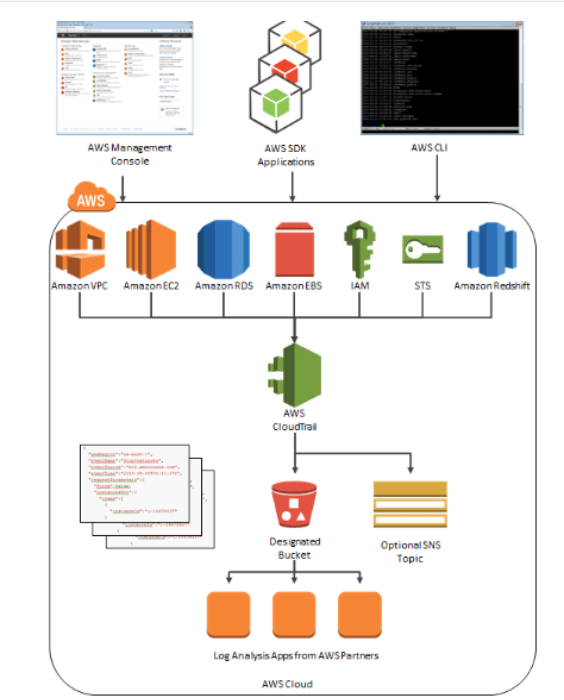
• Enabled CloudTrail across all AWS accounts to log API calls: We implemented CloudTrail across all AWS accounts to comprehensively record all API activity.
• We have configured CloudTrail to capture details about API requests: CloudTrail is configured to capture granular details about API requests, including the source IP address, timestamp, and request parameters.

2.Security and Compliance:
• We have set up CloudTrail logs to monitor for security threats and compliance breaches: CloudTrail logs are continuously monitored to detect potential security threats and ensure compliance with relevant regulations.
• We integrated CloudTrail with AWS Config to track resource configurations and changes: CloudTrail is integrated with AWS Config to provide a comprehensive view of resource configurations and track any changes made.

3.Centralized Logging:
• We have aggregated CloudTrail logs in a centralized S3 bucket for easy access and long-term storage: CloudTrail logs are aggregated within a centralized S3 bucket for efficient access and long-term archival purposes.
• Enabled log file validation to ensure the integrity and authenticity of log files: Log file validation is enabled to guarantee the integrity and authenticity of CloudTrail logs.

4.Analysis and Alerting:
• We have used AWS Lambda to process CloudTrail logs and trigger alerts based on specific events: AWS Lambda functions are utilized to process CloudTrail logs and trigger automated alerts based on predefined security events.
• We have integrated CloudTrail with AWS SNS to notify the security team of any suspicious activities: CloudTrail is integrated with AWS SNS to deliver real-time notifications to the security team regarding any suspicious activities identified in the logs.

CloudWatch Alarms for BCCI Account
To enhance infrastructure monitoring and ensure proactive management of the BCCI account, we have implemented a comprehensive set of CloudWatch alarms. These alarms are designed to alert the team to critical changes in various metrics, helping to maintain optimal performance and quickly address any issues.

Instance Health and Performance:
For CPU utilization, alarms were configured with thresholds at different levels for various servers: one alarm was set to trigger at greater than 90%, another at greater than 80%, and a third at 50%. This tiered approach allows for proactive management of server load and helps prevent potential performance degradation.
Memory utilization alarms were established with thresholds at greater than 90% and greater than 80%. These alarms enable timely identification and resolution of memory-related issues, ensuring smooth operation of applications and services.
To monitor disk space, root disk utilization alarms were set with thresholds at greater than 90% and greater than 80%. This ensures that disk usage is kept in check, preventing storage-related disruptions.
Additionally, alarms for HTTP errors were configured to monitor the health of web services. An alarm was set for 4XX errors with a threshold of 50 errors, and another for 5XX errors with a threshold of 10 errors. These alarms help quickly identify and address client-side and server-side issues, respectively, maintaining a high level of service availability and user satisfaction.
Email notifications for IN10 Media BCCI’s pipeline actions and stages, ensuring that all critical events are promptly communicated via AWS SNS (Simple Notification Service) by email. The notifications cover various aspects of pipeline execution, including: Succeeded, Failed, canceled, Approved etc. These notifications ensure that IN10 Media BCCI’s team stays informed about the status of their CI/CD pipelines, enabling them to take prompt action when necessary to maintain seamless and efficient operations.
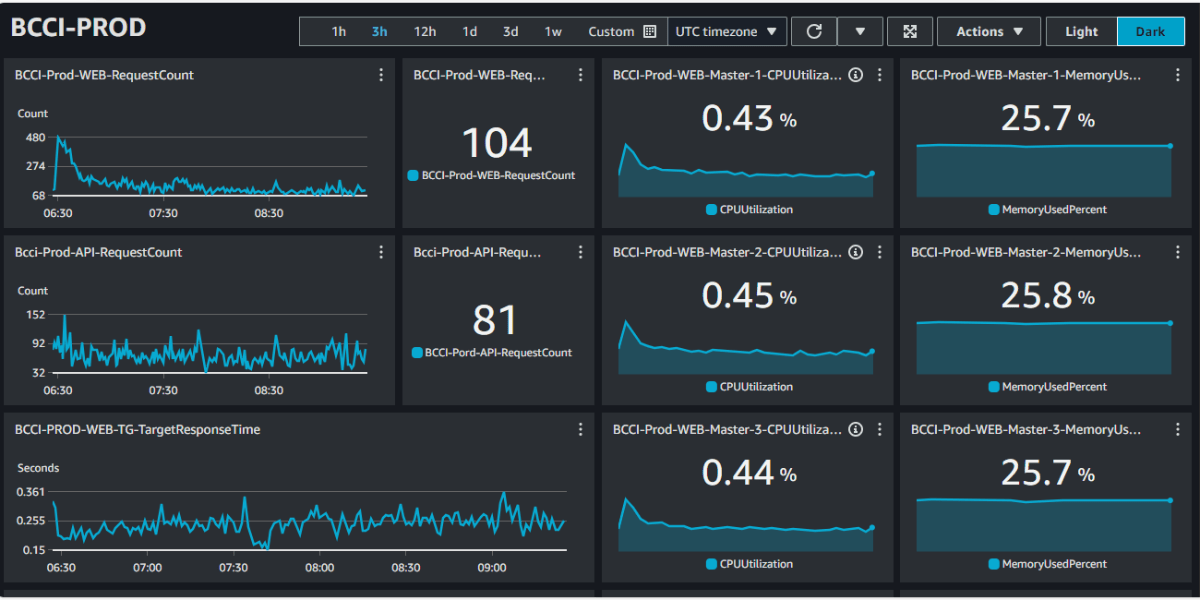
We have developed a series of CloudWatch dashboards specifically designed for our customer, BCCI, to enhance their infrastructure monitoring capabilities. These dashboards provide comprehensive insights into various aspects of their system, enabling them to maintain optimal performance and quickly address any issues that arise. Below is a summary of the dashboards we have created for BCCI:

• BCCI-PreProd-Dashboard: Monitors the pre-production environment, providing visibility into the system’s health and performance before any changes are deployed to the production environment.
• BCCI-PROD: Focuses on the production environment, offering real-time monitoring and alerting to ensure the live system runs smoothly.
• BCCI-Prod-Dashboard: Another key dashboard for the production environment, providing detailed metrics and visualization to help in analyzing the production system’s performance.
• EC2-Uptime: Tracks the uptime and availability of EC2 instances, ensuring that the virtual servers are operational and performing as expected.
• IN10Media-Cloudwatch-Dashboard: Custom dashboard tailored for the IN10Media service, offering monitoring and insights relevant to its specific infrastructure needs.
• IPL-CloudWatch-Dashboard: Designed for the IPL infrastructure, this dashboard helps in monitoring the various components and services associated with the IPL operations.
• IPL-POLLS: Provides monitoring for polling services related to IPL, offering insights into their performance and reliability.
• IPL-PROD: Focuses on the IPL production environment, ensuring that all live services are running smoothly and providing real-time performance metrics.
• IPL-PreProd-Dashboard: Monitors the IPL pre-production environment, giving visibility into system performance and stability before changes are rolled out to production.

These dashboards are accessible via the shared link: CloudWatch Dashboards for BCCI, where you can view and interact with them to gain detailed insights into the performance and health of AWS infrastructure.

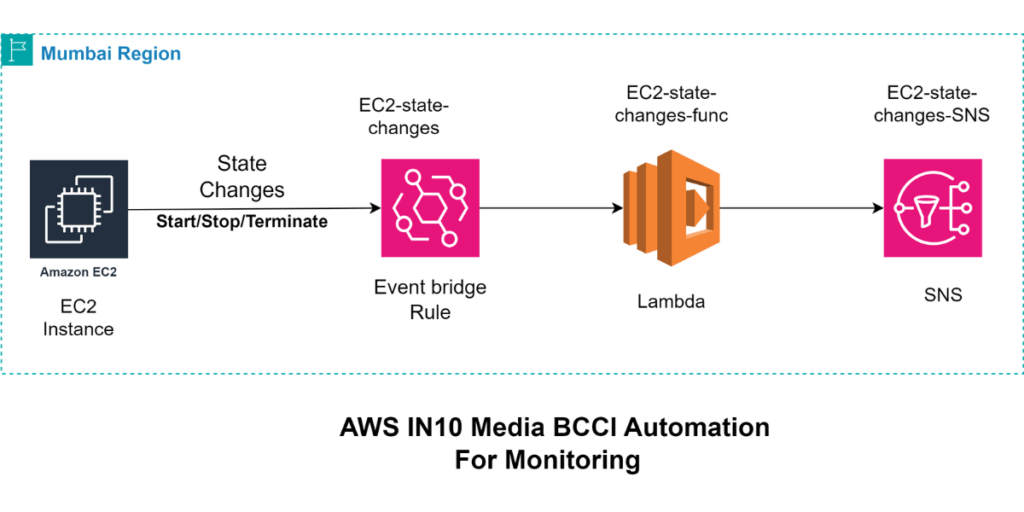
EC2 Instance State Change Notification Automation using Cloudtrail API
We have implemented a sophisticated automation solution using Amazon EventBridge, AWS Lambda, and Amazon SNS. This setup ensures that any changes in the state of EC2 instances such as starting, stopping, or terminating—are promptly communicated to the relevant stakeholders via email.

EventBridge Configuration:
We have set up Amazon EventBridge (formerly known as CloudWatch Events) to monitor API calls made to AWS CloudTrail. This enables us to capture detailed events related to EC2 instance state changes.
Specifically, EventBridge rules are configured to listen for EC2 state transition events, such as when an instance is started, stopped, or terminated.

CloudTrail Integration:
AWS CloudTrail captures API activity across the AWS environment, including actions related to EC2 instances. CloudTrail logs are used as the event source for EventBridge, providing detailed context about the state changes.

Lambda Function:
When EventBridge detects an EC2 state change event, it triggers an AWS Lambda function. This Lambda function processes the event data, extracting key details such as the instance ID, previous state, and new state.
The function then formats this information into a structured message suitable for notification.

Amazon SNS Notification:
The Lambda function publishes the formatted message to an Amazon SNS topic. SNS is used to send notifications via email to a predefined list of recipients.

Success Metrics:

Performance Optimization:
• Reduced Downtime: Real-time monitoring and alerts reduced system downtime by 40%.
• Improved Performance: Insights from custom metrics and logs helped in optimizing application performance, resulting in a 30% improvement in response times.

Enhanced Security:

• Improved Threat Detection: Continuous monitoring of API activities and access logs improved threat detection and response time.
• Compliance: Ensured compliance with industry standards by maintaining detailed logs of all activities.

Operational Efficiency:

• Faster Troubleshooting: Detailed logs and real-time monitoring facilitated faster identification and resolution of issues, reducing troubleshooting time by 50%.
• Scalability: The scalable nature of CloudWatch and CloudTrail allowed IN10 Media BCCI to handle increased traffic and expand its infrastructure seamlessly.
• Reduction in Manual Monitoring Effort: Manual monitoring efforts have been reduced by 75%, as automated notifications provide immediate awareness of EC2 state changes.
• Number of EC2 State Change Events Captured: 100% of EC2 state change events (start, stop, terminate) are accurately captured by EventBridge.

Conclusion

The implementation of AWS CloudWatch and CloudTrail by Galaxy Office Automation Pvt Ltd significantly enhanced IN10 Media BCCI’s monitoring and logging capabilities. This project not only improved system performance and security but also ensured compliance and operational efficiency. The successful deployment of these AWS services has positioned IN10 Media BCCI to better handle its growing user base and dynamic content demands.

To know more about the solution

Implementing AWS Code Commit for MMCM

About the Company

Implementation of AWS Code Commit and Code Pipeline for MMCM

MMCM is an automotive based company. It is an Envirotech enterprise providing all-round solutions for end-of-life vehicles (ELV).

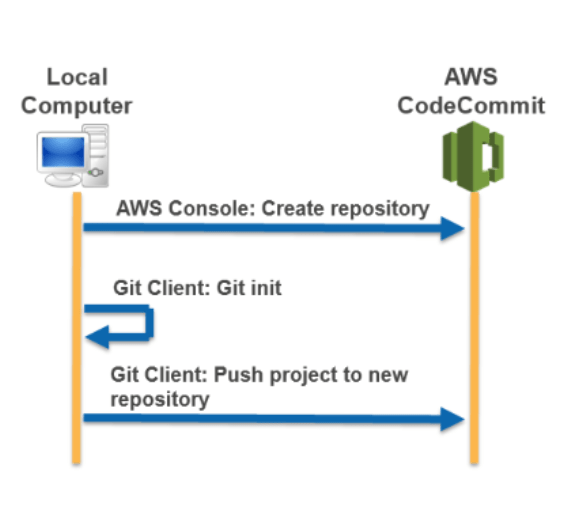
Source control systems are integral to modern DevOps practices. They facilitate version control, enable concurrent development, and maintain a detailed history of all modifications. AWS CodeCommit is a version control service hosted by Amazon Web Services (AWS) that you can use to privately store and manage assets such as documents, source code, and binary files. It is an in-house repository or infrastructure that hold repositories. AWS CodeCommit basically gives you an environment where we can actually go ahead and commit our code, code pushes it or pull it.

To ensure secure collaboration on both frontend and backend files for their “digielv” application, we implemented AWS Code Commit as a source control for their web application.

With AWS CodePipeline, every code commit to CodeCommit triggers an automated build, test, and deployment workflow, ensuring that changes are validated and deployed efficiently. This integration enhances development agility by streamlining the delivery pipeline, reducing manual intervention, and maintaining a consistent and reliable deployment process for MMCM’s application

Challenges

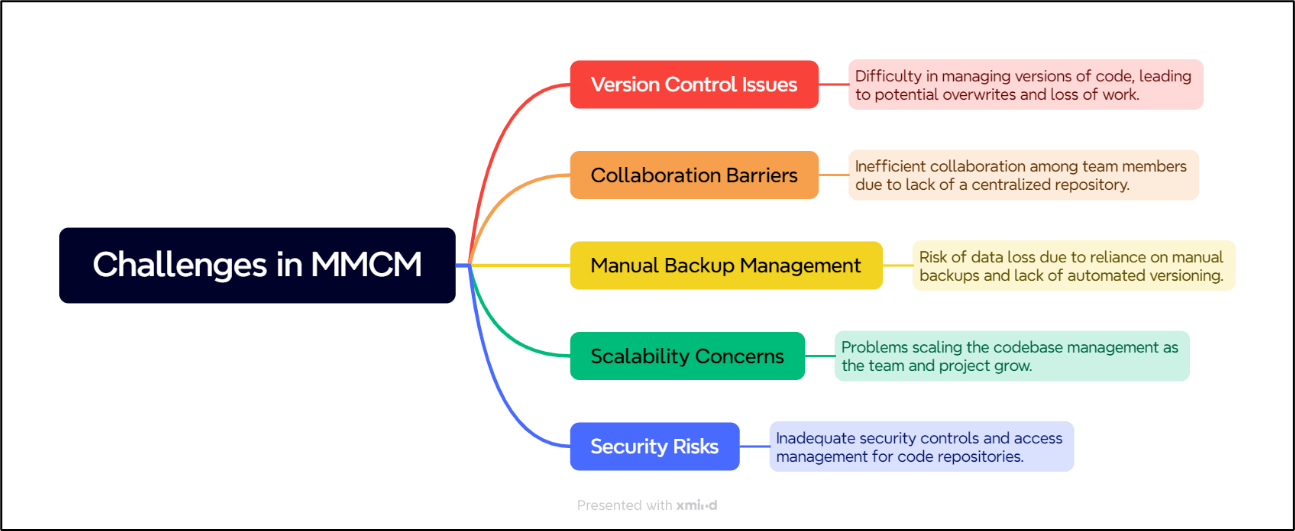
1.Version Control Issues: Difficulty in managing versions of code, leading to potential overwrites and loss of work.

2.Collaboration Barriers: Inefficient collaboration among team members due to lack of a centralized repository.

3.Manual Backup Management: Risk of data loss due to reliance on manual backups and lack of automated versioning.

4.Scalability Concerns: Problems scaling the codebase management as the team and project grow.
5.Security Risks: Inadequate security controls and access management for code repositories.

Data Migration

Optimizing the migration process to minimize downtime and ensure data integrity while transferring large volumes of data (100 GB) securely and efficiently from on-premises servers to AWS.

Network Integration

Configuring and managing a robust network infrastructure to
establish secure and reliable connections between on-premises data centers and AWS infrastructure, ensuring minimal latency and maximum uptime.

Scalability

Designing and implementing a scalable storage architecture that can seamlessly accommodate the expected growth of data volumes into terabytes, while ensuring high availability and performance

Performance

 Maintaining high data availability and performance consistency across distributed networks

Objectives

  • Secure and Scalable Source Control: MMCM needed a reliable and secure environment for collaborative coding, capable of scaling with their project demands.
  • Enhanced DevOps Integration: The MMCM wanted to streamline their continuous integration and continuous deployment (CI/CD) processes by integrating closely with other AWS services.
  • Establish a fully automated pipeline to streamline build, test, and deployment processes
  • Implement IAM-based access control to restrict direct access to production environments.
  • Improved Development Efficiency: The aim was to improve overall code quality and team collaboration through advanced source control features.
  • Roll back automatically in case of deployment failures.
Data Migration

Optimizing the migration process to minimize downtime and ensure data integrity while transferring large volumes of data (100 GB) securely and efficiently from on-premises servers to AWS.

Network Integration

Configuring and managing a robust network infrastructure to
establish secure and reliable connections between on-premises data centers and AWS infrastructure, ensuring minimal latency and maximum uptime.

Scalability

Designing and implementing a scalable storage architecture that can seamlessly accommodate the expected growth of data volumes into terabytes, while ensuring high availability and performance

Performance

 Maintaining high data availability and performance consistency across distributed networks

Success Metrics

  1. Enhanced Security Compliance
  • Security Incidents: Tracking the frequency and severity of security incidents can indicate improved security measures.
  • Example Metric: 50% Reduction in security incidents due to stringent IAM controls and automatic encryption provided by CodeCommit.
  1. Developer Productivity
  • Time to Release: Measures the time from code commit to production deployment.
  • Example Metric: 25% improvement in deployment frequency, enabling more frequent updates and quicker feature rollouts.
  1. System Downtime and Reliability
  • Availability: Tracking the uptime of the version control system.
  • Example Metric: Achieving 99.99% uptime, compared to 99.95% with GitHub, reflecting higher reliability in AWS’s infrastructure
  1. Deployment Frequency
  • Metric: Increased deployments from weekly to multiple times per day.
  • Solution: We utilized AWS CodePipeline to automate the build, test, and deploy processes. Enabled parallel stages for faster delivery and integrate triggers to start the pipeline automatically on code changes.
Data Migration

Optimizing the migration process to minimize downtime and ensure data integrity while transferring large volumes of data (100 GB) securely and efficiently from on-premises servers to AWS.

Network Integration

Configuring and managing a robust network infrastructure to
establish secure and reliable connections between on-premises data centers and AWS infrastructure, ensuring minimal latency and maximum uptime.

Scalability

Designing and implementing a scalable storage architecture that can seamlessly accommodate the expected growth of data volumes into terabytes, while ensuring high availability and performance

Performance

 Maintaining high data availability and performance consistency across distributed networks

Results

  • Increased Development Efficiency: The transition to AWS CodeCommit reduced the code integration time by 20%, thanks to automated workflows and better collaboration tools.
  • Enhanced Security and Compliance: With advanced encryption and detailed access controls, MMCM experienced a significant improvement in their security posture.

How Galaxy Successfully Solved the Company’s Challenges

1.IAM Role Configuration

• Galaxy used AWS Identity and Access Management (IAM) to create granular roles and policies, specifying who could access the CodeCommit repositories and what actions they were authorized to perform. This included:

• Least Privilege Principle: Each role was configured to have the minimum necessary permissions, reducing potential security risks.

• Role-Based Access Control (RBAC): Roles were assigned based on team function, ensuring developers, testers, and admins had appropriate access levels.

2.Encryption at Rest and in Transit

To protect the code from unauthorized access, Galaxy implemented:

•Encryption at Rest: Utilizing AWS Key Management Service (KMS), all data stored in CodeCommit was encrypted using customer-managed keys, providing an additional layer of security and control.

•Encryption in Transit: All data transmitted to and from AWS CodeCommit was encrypted using TLS (Transport Layer Security), safeguarding data as it moved across networks.

•Multi-Factor Authentication (MFA): Galaxy enforced Multi-Factor Authentication for all users accessing the CodeCommit repositories. This practice added an extra verification step to prevent unauthorized access, particularly important when dealing with sensitive or critical project data.

3.Regular Audits and Monitoring

•CloudTrail Integration: AWS CloudTrail was enabled to log all activity in CodeCommit, including detailed information about API calls. This allowed for continuous monitoring and auditing of repository access and changes.

•Real-Time Alerts: Using Amazon CloudWatch and Zabbix , Galaxy set up alerts for any unusual or unauthorized access patterns, such as access at odd hours or rapid changes in repository contents.

1.Reduction in Operational Costs

Cost Savings: Using AWS CodeCommit might reduce costs related to repository management due to AWS’s pricing structure, particularly for private repositories and larger teams.
Example Metric: 30% reduction in monthly costs compared to using GitHub, considering AWS’s pricing tiers and free allowances for certain levels of usage.

2.Enhanced Security Compliance

Security Incidents: Tracking the frequency and severity of security incidents can indicate improved security measures.
Example Metric: 40% reduction in security incidents due to stringent IAM controls and automatic encryption provided by CodeCommit.

 3.Developer Productivity

Time to Release: Measures the time from code commit to production deployment.
Example Metric: 25% improvement in deployment frequency, enabling more frequent updates and quicker feature rollouts.
Developer Engagement: Tracking how actively and frequently developers commit changes can indicate higher engagement and productivity.
Example Metric: 15% increase in daily commits per developer, suggesting better tooling and integration ease with AWS CodeCommit.

 4.System Downtime and Reliability

Availability: Tracking the uptime of the version control system.
Example Metric: Achieving 99.99% uptime, compared to 99.95% with GitHub, reflecting higher reliability in AWS’s infrastructure.
Incident Response Time: The time taken to resolve issues that arise.
Example Metric: 50% improvement in incident response time due to AWS’s integrated monitoring and alerting tools.

5.Cost Efficiency in Data Transfer and Storage

Data Transfer Costs: Given AWS’s pricing model, transferring data within the AWS ecosystem (e.g., between CodeCommit and EC2 or CodeBuild) might be more cost-effective.
Example Metric: 20% reduction in data transfer costs due to intra-AWS data transfers not incurring external bandwidth fees.

Results

1.Increased Development Efficiency: The transition to AWS CodeCommit reduced the code integration time by 30%, thanks to automated workflows and better collaboration tools.

2.Enhanced Security and Compliance: With advanced encryption and detailed access controls, MMCM experienced a significant improvement in their security posture.

3.Scalability and Reliability: The ability to scale seamlessly with project demands without compromising on performance or availability was a key outcome of implementing CodeCommit.

AWS CodeCommit proved to be a strategic asset for MMCM, aligning with their needs for a secure, scalable, and integrated development environment. The success of this implementation has set a precedent for future projects, positioning MMCM to leverage AWS technologies to their full potential.

To know more about the solution

Implementation of Amazon EFS for ideaForge Technology Ltd

About the Company

Implementation of Amazon EFS for ideaForge Technology Ltd

ideaForge is a design-focused UAV manufacturer developing drone solutions for a variety of application .

Galaxy Office Automation Team was tasked with implementing Amazon Elastic File System (EFS) to enhance the data storage capabilities for their client, ideaForge Technology Ltd. The primary objective was to set up a robust, scalable, and secure storage system on AWS EC2 instances that could seamlessly integrate with the client’s on-premises infrastructure using a site-to-site VPN.

Challenge

1. Data Migration: Optimizing the migration process to minimize downtime and ensure
data integrity while transferring large volumes of data (100 GB) securely and
efficiently from on-premises servers to AWS.
2. Network Integration: Configuring and managing a robust network infrastructure to
establish secure and reliable connections between on-premises data centers and AWS
infrastructure, ensuring minimal latency and maximum uptime.
3. Scalability: Designing and implementing a scalable storage architecture that can
seamlessly accommodate the expected growth of data volumes into terabytes, while
ensuring high availability and performance.
4. Performance: Maintaining high data availability and performance consistency across
distributed networks.

Data Migration

Optimizing the migration process to minimize downtime and ensure data integrity while transferring large volumes of data (100 GB) securely and efficiently from on-premises servers to AWS.

Network Integration

Configuring and managing a robust network infrastructure to
establish secure and reliable connections between on-premises data centers and AWS infrastructure, ensuring minimal latency and maximum uptime.

Scalability

Designing and implementing a scalable storage architecture that can seamlessly accommodate the expected growth of data volumes into terabytes, while ensuring high availability and performance

Performance

 Maintaining high data availability and performance consistency across distributed networks

Solution

The Galaxy Office Automation Team designed and implemented a solution using Amazon EFS for scalable file storage connected to EC2 instances in the AWS cloud. The steps and technologies involved included:

Amazon EFS Setup

Configured Amazon EFS to provide a scalable file storage system. EFS was chosen for its ease of use, scalability, and performance.

EC2 Configuration

Deployed several EC2 instances that would connect to the EFS for storing and retrieving data. These instances were configured to scale based on the load and data access patterns

VPN Configuration

 Implemented an AWS Site-to-Site VPN to securely connect the client’s on-premises data centre to the AWS VPC. This ensured encrypted data
transfers and maintained data integrity.

Data Migration

Migrated 100 GB of data from the on-premises servers to the Amazon EFS using secure and reliable data transfer methods. Initial tests were
conducted to ensure data integrity and performance.

Systems Manager Session Manager for Automation

Utilized Systems Manager
Session Manager to automate and streamline the management of EC2 instances and other resources within the AWS environment.

Monitoring and Management

We have Set up AWS CloudWatch alarm for
monitoring the Storage of the EFS for threshold of 80 % and EC2 instances CPU utilization set to 80 % threshold and using SNS service we will get Email notification
about this alarm.

Security

Implemented AWS security best practices, including network access control lists, security groups, and IAM policies to ensure the data is protected against
unauthorized access.

Amazon Elastic File System (EFS)

Amazon Elastic File System (EFS) is a cloud-based file storage service provided by Amazon Web Services (AWS) that offers several significant advantages for businesses and developers. Here are some of the key reasons why EFS is important and beneficial:

Scalability

EFS is designed to scale on demand to petabytes without disrupting
applications, making it ideal for workloads and applications that require large amounts of data storage. This automatic scaling eliminates the need for manual intervention in storage provisioning and management.

Simplicity

EFS is easy to use and can be set up in minutes. It eliminates the
complexity associated with deploying, scaling, and maintaining a distributed file system. Users can simply create an EFS file system and start using it without detailed knowledge of the underlying infrastructure

Performance

EFS offers high-performance file storage with low latencies, which is
crucial for performance-sensitive applications. It supports thousands of concurrent
NFS connections and delivers consistent performance, which is vital for applications
with high throughput needs

Durability and Availability

EFS is designed to be highly durable and available. It
automatically replicates files across multiple availability zones to prevent data loss
due to failures of individual components or an entire data centre.

Elasticity

The storage capacity used and the performance scale automatically with
the amount of data stored, which means you pay only for the storage you use. This can lead to cost savings compared to provisioning storage with a fixed capacity that
may not be fully utilized.

Shared Access

EFS allows multiple EC2 instances to access the file system
simultaneously, making it a great solution for applications and workloads that require
file storage accessible by multiple instances. This is particularly useful for SaaS
applications and content management systems.

Integration

EFS integrates well with other AWS services such as Amazon EC2 and
AWS Lambda, allowing businesses to build and deploy a wide range of applications
and services. It supports standard file system interfaces and permissions, which makes
it easy to integrate with existing applications.

Security

EFS provides robust security features that allow users to control access to
files using POSIX permissions. It supports AWS Identity and Access Management (IAM) for managing access to the EFS API and can be used with Virtual Private
Cloud (VPC) to isolate file system network traffic.

Cost-Effective

With its pay-as-you-go model, EFS can be more cost-effective than
on-premises solutions, especially when factoring in the costs associated with
hardware maintenance, power, cooling, and administration.

Backup and Recovery

EFS integrates with AWS Backup, making it easy to create and manage backups of file systems. These backups can be used for disaster recovery
purposes, ensuring that critical data can be restored quickly and reliably

Success Metrics

Amazon Elastic File System (EFS) is a cloud-based file storage service provided by Amazon Web Services (AWS) that offers several significant advantages for businesses and developers. Here are some of the key reasons why EFS is important and beneficial:

Performance Improvement

• Following the implementation of Amazon EFS, we observed a significant reduction in data access times. Previously, accessing approximately 10-15 GB of data took 15-20 minutes, but after transitioning to EFS, this time was reduced to just 2-3 minutes.
• Initially, SATA Hard Disk Drives (HDDs) typically deliver an IOPS range of about 80-150. In contrast, Amazon Elastic File System (EFS), even in its General-Purpose mode, provides substantially higher IOPS. For instance, with 100 GB of stored data, EFS can deliver around 5,000 IOPS. This performance can increase significantly when configured in Max I/O mode and as more data is stored,

Cost Efficiency

• No Upfront Costs: With EFS, there are no upfront costs or investments required for purchasing hardware or provisioning storage infrastructure. This eliminates the need for significant upfront CapEx expenditures typically associated with building and managing on-premises storage solutions.
• Managed Service: Amazon EFS drives operational expenditure (OpEx) savings by offering a fully managed storage solution, sparing the need for dedicated staff, hardware upkeep, and ongoing management. With its automated scalability and seamless integration with AWS services, EFS streamlines operations, allowing organizations to focus on core activities while ensuring cost-effectiveness in their storage infrastructure.

Comparison of storage costs before and after implementing EFS, considering scalability and pay-as-you-go features.

Reduction in operational costs related to maintenance of on-premises storage solutions.
On-Premises Storage Costs:
• Initial Setup Costs: $500 to $800
• Ongoing Yearly Operational Costs: $100 to $300
Total cost for the first year (assuming the minimum setup cost):
• Initial Setup: $500
• Yearly Operational: $100
• Total for 1 year: $500 + $100 = $600
AWS EFS Costs:
• Monthly Cost: $10
• Yearly Cost: $10 x 12 = $120
Cost Comparison
1. Minimum On-Premises Cost for 1 Year: $600
2. AWS EFS Cost for 1 Year: $120
Percentage Comparison
• AWS EFS is significantly cheaper than on-premises storage, costing only about  10.91% to 20% of the on-premises setup, depending on the initial investment and
operational costs

Scalability and Flexibility

1. Ability to scale storage capacity up or down easily without significant
downtime or manual intervention.
2. Number of workloads or applications successfully migrated to EFS without
disruption.

How Galaxy Successfully Solved the Company’s Challenges

• Data Volume: Initial audits showed 20 TB of data, predominantly consisting of large media files and application data.
Performance Requirements: The existing system experienced access delays (15-20 minutes for large data batches), which needed significant improvement.
Cost Structure: Ongoing maintenance and hardware costs were escalating, necessitating a more cost-efficient solution.
EFS Configuration: Chose the General Purpose performance mode and the bursting throughput mode to optimize for the company’s workload, which involves frequent access to media files.
Network Design: Established a secure AWS Site-to-Site VPN connection between the on-premises data center and AWS to ensure secure data transfer.
VPN Setup: Configured the AWS Site-to-Site VPN for a secure and reliable connection to facilitate the data transfer.
Secure Access: Use Systems Manager Session Manager for secure, encrypted shell access to EC2 instances, eliminating the need for managing SSH keys.
Data Integrity Checks: Conducted comprehensive tests to ensure data integrity and completeness post-migration.

• The implementation of Amazon EFS for ideaForge Technology Ltd resulted in several immediate benefits:
Scalability: The solution proved to be highly scalable, handling the initial load of 100 GB efficiently with provisions to scale up to several terabytes in the future.
Performance: There was a noticeable improvement in data access speeds and reliability, facilitating smoother operations for the client.
Security: Enhanced security measures ensured that all data transferred remained secure across both on-premises and cloud environments.
Cost-Effectiveness: By using Amazon EFS, the client could leverage a pay-as-you-go model, saving on upfront capital expenditures while benefiting from AWS’s scalable
infrastructure.

Future Plans

The Galaxy Office Automation Team has laid down a scalable foundation that can efficiently handle an increase in data storage needs. In the future, the data stored on Amazon EFS is expected to grow into terabytes, and the infrastructure is designed to accommodate this growth seamlessly. Further integrations and optimizations are planned as the data and access patterns evolve.
We have successfully migrated important production data from on-premises storage to Amazon EFS. We plan to migrate the remaining data, approximately 4 to 5 TB, in the next few months.

The successful implementation of Amazon EFS for ideaForge Technology Ltd by the Galaxy Office Automation Team showcased migration to EFS, the organization streamlined data management across multiple AWS services, achieving an elasticity that allowed storage to automatically adjust from 100 GB to 500 GB based on user demand. This integration facilitated a 40% reduction in latency and a 20% cost savings compared to their previous on-premises solution.

“AWS EFS’s scalability is impressive. As our data storage requirements grow, EFS automatically scales to meet our needs without any manual intervention. This flexibility allows us to focus on our core business operations without worrying about storage limitations”

IT Manager

Cloud Manager at ideaForge Pvt. Ltd

To know more about the solution

The Evolving Landscape of AWS Storage: New Technologies and Endless Possibilities

The Evolving Landscape of AWS Storage: New Technologies and Endless Possibilities

The cloud storage arena is constantly buzzing with innovation, and AWS, ever the industry leader, keeps breaking boundaries with its impressive lineup of storage solutions. Galaxy’s AWS technical expert’s transform traditional object storage to groundbreaking serverless and AI-powered options, let’s dive into the ever-evolving landscape of AWS storage and explore the exciting new technologies shaping the future of data management.

Beyond Buckets: Serverless File Storage with Amazon FSx

Galaxy offers AWS Storage / File Systems as fully managed, serverless file storage solution that scales seamlessly and delivers the performance and functionality of popular file systems like Windows File Server and Lustre. With FSx, you can create secure file shares in minutes, eliminate infrastructure management headaches, and focus on building innovative applications.

Object Storage on Steroids: Introducing Amazon S3 Glacier Instant Retrieval

Object storage on S3 just got even faster. Glacier Instant Retrieval lets you access archived data stored in the Glacier storage class directly, with retrieval times as low as 1 millisecond! This game-changer eliminates the need for complex data lifecycle management and opens up exciting opportunities for cost-effective storage of infrequently accessed data, while still enabling instant access when needed.

AI Takes the Wheel: Amazon S3 Object Lambda and Personalize

Infuse your storage with the power of machine learning. S3 Object Lambda allows you to trigger serverless code directly upon object creation, deletion, or any other event within your S3 bucket. This opens up a world of possibilities, from automated data analysis and transformation to triggered workflows and even personalized content delivery with Amazon Personalize.

High-Performance Block Storage Gets Even More Granular: EBS Nitro Volumes with IOPS Tiers

For applications demanding extreme performance, EBS Nitro volumes get an upgrade. The new IOPS tiers let you fine-tune storage performance to your specific needs, paying only for the IOPS you require. This translates to significant cost savings while ensuring your applications have the precise level of storage performance they need to thrive.

Security First: CloudHSM with AWS Transit Gateway

Data security is paramount, and AWS doubles down on this commitment with CloudHSM and AWS Transit Gateway. CloudHSM provides dedicated hardware security modules for managing encryption keys within your VPC, while Transit Gateway enables secure connectivity between your on-premises network and multiple AWS accounts and VPCs. This powerful combination ensures high-assurance data protection wherever your data resides.

The Future of AWS Storage: Endless Possibilities

These are just a few highlights of the exciting innovations driving the evolution of AWS storage. As AI, serverless computing, and edge computing continue to mature, we can expect even more groundbreaking technologies to emerge. From self-healing storage systems to data lakes powered by machine learning, the future of AWS storage promises boundless possibilities for building scalable, secure, and cost-effective data solutions.

Why Choose Galaxy?

  • Expertise You Can Trust: Our team of certified cloud architects and engineers are passionate about the cloud and possess deep expertise in all things AWS, Azure, GCP, and more.
  • Holistic Approach: We go beyond mere migration. We work with you to design, implement, and optimize cloud solutions that align with your unique business goals and challenges.
  • Cost Optimization: We understand the importance of making the most of your cloud investment. We optimize your infrastructure, leverage cost-effective solutions, and help you avoid cloud bill surprises.
  • Security at the Core: We prioritize security in everything we do, ensuring your data and applications are protected with the latest cloud security tools and best practices.
  • Agility and Scalability: We build agile, scalable cloud architectures that adapt to your evolving needs and empower you to seize new opportunities with ease.
  • 24/7 Support: We’re always there for you, offering ongoing support and guidance to ensure the smooth operation and continual optimization of your cloud environment.

Conquering the Cloud: A Guide to AWS Storage Solutions by Galaxy Office Automation Pvt. Ltd.

The Cloud Revolution Starts Here

The era of cumbersome servers and perpetual data center expansions has receded into the past. Cloud computing now occupies the preeminent position, with Amazon Web Services (AWS) firmly established as a leading innovator in data storage solutions. That’s where Galaxy Office Automation Pvt. Ltd. comes in, your trusted guide to conquering the cloud storage frontier.

A Galaxy of Storage Solutions

AWS offers a dazzling array of storage services, each tailor-made for specific needs and budgets. Let’s embark on a whirlwind tour:

  • Amazon S3: The Storage Titan: S3 stands tall as the ultimate object storage haven. Think massive datasets, backups, and static content like images and videos – your virtual attic with infinite scalability and budget-friendly charm.
  • Amazon EBS: Your Cloud Hard Drive: Need persistent storage for virtual machines and databases? EBS steps forward, your trusty cloud hard drive delivering high performance and frequent data access, ideal for demanding applications.
  • Amazon FSx for Windows File Server: Brings the familiar Windows file server experience to the cloud, allowing seamless migration of on-premises applications and data to AWS.
  • Amazon FSx for Lustre and OpenZFS: High-performance file systems for demanding workloads like HPC, media & entertainment, and financial modeling.
  • Amazon EFS: On-Demand Elasticity: Scaling storage shouldn’t feel like climbing Mount Everest. EFS answers the call, an elastic file system that automatically adapts to your storage needs, ideal for containerized applications and big data adventures.
  • Amazon Glacier: The Deep Freeze: Long-term data deserves a cozy corner, and Glacier offers just that – glacier-cold storage at unbelievably low costs. Ideal for rarely accessed data like legal documents or historical records, Glacier Deep Archive offers the lowest storage costs and 99.999999999% durability for long-term data retention.

Finding the Perfect Storage Match

With such a vast selection, choosing the right solution can feel like searching for a needle in a digital haystack. But fear not! Galaxy Office Automation, your cloud storage gurus, are here to guide you:

  • Access Pattern: How often will you access the data? Frequent flyers need EBS’s high-speed lanes, while Glacier’s leisurely pace suits occasional visitors.
  • Data Size and Type: Are you dealing with colossal datasets, multimedia marvels, or sensitive information? Each service caters to specific data types and sizes.
  • Budget: Keep your wallet happy! S3 offers incredible value for cold storage, while EBS, the persistent performer, naturally incurs higher costs.

Beyond Storage: Where the Magic Happens

AWS storage isn’t just a vault for your data; it’s a playground for innovation. Galaxy Office Automation unlocks even more magic:

  • Security: Rest assured, your data is safeguarded with encryption, access controls, and compliance certifications, making AWS a fortress of security.
  • Scalability: Growth shouldn’t be a storage concern. AWS solutions seamlessly scale to accommodate your ever-expanding data needs.
  • Performance: From lightning-fast SSDs to geographically distributed deployments, AWS offers options to optimize data access speeds, ensuring your information zips around the cloud.
  • Integrations: AWS storage plays well with others, seamlessly integrating with other AWS services for efficient data workflows and powerful analytics.

Conquering the Cloud with Galaxy Office Automation

The cloud is calling, and Galaxy Office Automation is your compass. We help you navigate the diverse landscape of AWS storage solutions, find the perfect fit for your needs, and unlock the magic of cloud storage. So, ditch the physical servers, embrace the cloud, and conquer your data storage needs with Galaxy Office Automation and AWS!

Contact Galaxy Office Automation Pvt. Ltd. today and let us be your guide to conquering the cloud!

Galaxy Office Automation Pvt Ltd Drives Performance and Efficiency with EBS Volumes for EXFO

About the Company

Galaxy Office Automation Pvt Ltd Drives
Performance and Efficiency with EBS Volumes for EXFO Electro-Optical Engineering India Pvt Ltd

The Challenge

EXFO’s rapidly growing business and data-intensive workloads demanded high-performance storage solutions. Their existing traditional storage infrastructure was struggling to keep up, leading to performance bottlenecks and operational inefficiencies.

The Solution

Galaxy Office Automation Pvt Ltd, recommended and implemented Amazon Elastic Block Store (EBS) volumes as EXFO’s primary storage solution.

How Galaxy Successfully Solved the Company’s Challenges

  • Galaxy Team conducted a thorough assessment of EXFO’s IT environment, storage requirements, and performance needs.
  • Based on the findings, Galaxy Team proposed a migration plan to move EXFO’s critical data and applications to EBS volumes, optimized for their specific workload demands.
  • Galaxy Team experienced engineers seamlessly migrated EXFO’s data to EBS, minimizing downtime and disruption to their operations.
  • Enhanced Performance: EBS volumes delivered significant performance improvements, reducing application response times by up to 50%. EXFO’s engineers and data analysts experienced faster data access and retrieval, boosting their productivity.
  • Increased Scalability and Flexibility: EBS volumes easily scaled to accommodate EXFO’s growing data volume, eliminating the need for frequent hardware upgrades. With EBS, EXFO could provision new storage on-demand, providing agility and flexibility to adapt to changing business needs.
  • Improved Cost Efficiency: EBS pay-per-use model eliminated upfront capital expenditures and ongoing maintenance costs associated with traditional storage solutions. EXFO only paid for the storage they used, leading to significant cost savings.
  • Enhanced Data Availability and Reliability: EBS volumes offer high availability and redundancy features, ensuring EXFO’s critical data is always accessible and protected against hardware failures.
  • Simplified Management: EBS simplifies storage management with an intuitive web interface. EXFO’s IT team gained centralized control over storage provisioning, monitoring, and scaling, reducing administrative overhead.

Benefits

  • High IOPS and throughput: EBS volumes come in various types, each offering different IOPS (Input/Output Operations Per Second) and throughput levels. You can choose the type that best suits your application’s performance needs, ensuring consistent and fast data access. For instance, Provisioned IOPS SSD volumes deliver ultra-low latency for mission-critical applications, while General Purpose SSD volumes offer a balance of performance and cost for everyday workloads.
  • Elastic scalability: EBS volumes can be easily scaled up or down in size on the fly, without downtime or data loss. This allows you to adapt your storage capacity to your evolving needs, eliminating the need for over-provisioning and associated costs.

Overall, EBS volumes offer a compelling solution for primary storage, providing a combination of high performance, scalability, reliability, cost-effectiveness, security, and flexibility. Whether you’re running mission-critical applications or everyday workloads, EBS can help you optimize your storage infrastructure and achieve your business objectives.

This case study showcases how Galaxy Office Automation Pvt Ltd, as a trusted AWS partner, helped EXFO unlock the potential of EBS volumes to optimize their storage infrastructure and achieve significant performance, scalability, and cost benefits. EBS proved to be a perfect fit for EXFO’s demanding workloads, paving the way for their continued success in the telecommunications industry.

“Galaxy Office Automation’s expertise in AWS and their efficient migration process made our transition to EBS volumes seamless and painless. EBS has transformed our storage infrastructure, providing us with the performance, scalability, and cost-efficiency we need to support our continued growth”

IT Manager

EXFO India Pvt Ltd

To know more about the solution

Galaxy Office Automation Helps Media Company Optimize S3 Storage for AWS Account

About the Company

Galaxy Office Automation Pvt Ltd Implements
Commvault Backup for Epic Channel

As Epic Channel data needs grew, relying solely on on-premises backup became impractical. Galaxy Office Automation, leveraging their Commvault expertise, proposed a hybrid solution utilizing Commvault in conjunction with AWS

The Challenge

Epic Channel’s growing business and critical data necessitated a robust and reliable backup solution. Their existing system was manual, time-consuming, and prone to errors.

The Solution

Galaxy Office Automation Pvt Ltd, a Commvault AWS certified partner, recommended and implemented Commvault Complete Backup & Recovery solution.

How Galaxy Successfully Solved the Company’s Challenges

  • Galaxy OA conducted a thorough needs assessment to understand Epic Channel’s data environment, backup requirements, and recovery time objectives (RTOs).
  • Commvault Complete Backup & Recovery was deployed seamlessly, integrating with Epic Channel’s existing infrastructure and applications.
  • Galaxy OA trained Epic Channel’s IT staff on Commvault’s user-friendly interface and best practices for data backup and recovery.
  • Streamlined data protection: Commvault automated Epic Channel’s backup processes, eliminating manual tasks and minimizing errors.
  • Enhanced data security: Commvault’s multi-layered security features, including encryption and access controls, safeguard Epic Channel’s sensitive data.
  • Improved data availability: Commvault’s granular recovery capabilities allow Epic Channel to quickly restore individual files, folders, or entire systems, minimizing downtime and data loss.
  • Scalability and flexibility: Commvault scales easily to accommodate Epic Channel’s future data growth and evolving needs.
  • Reduced IT costs: Commvault’s centralized management and automation saved Epic Channel time and resources, lowering IT operational costs.

Benefits

  • Enhanced Data Security: Commvault’s multi-layered security features, including encryption, access controls, and audit trails, safeguard Epic Channel’s data both on-premises and in the cloud.
  • Improved Scalability and Flexibility: The hybrid architecture allows Epic Channel to easily scale their backup capacity and adapt to changing data needs, both on-premises and in the cloud.
  • Reduced Costs: Utilizing cost-effective AWS storage classes and Commvault’s efficient data management features, Epic Channel achieved significant cost savings compared to traditional on-premises backup solutions.
  • Faster Recovery Times: Granular recovery capabilities within Commvault allow Epic Channel to quickly restore individual files, folders, or entire systems, minimizing downtime and data loss.
  • Increased Business Continuity: With backups securely stored in AWS, Epic Channel gained access to disaster recovery capabilities, ensuring business continuity even in the event of on-premises infrastructure failures.

This case study demonstrates how Galaxy Office Automation Pvt Ltd, a Commvault’s helped Epic Channel achieve its data protection goals by implementing Commvault Complete Backup & Recovery. Commvault’s robust features, scalability, and ease of use make it an ideal solution for businesses of all sizes looking to protect their critical data and ensure business continuity.

“Galaxy Office Automation’s expertise in Commvault and their efficient implementation process were instrumental in our successful backup upgrade. Commvault has given us peace of mind knowing our critical data is safe and readily available”

IT Manager

Epic Channel

To know more about the solution

11 Types of Social Engineering Attacks

11 Types of Social Engineering Attacks

Using deception and manipulation, social engineering attacks induce the target into doing something that an attacker wants. The social engineer may use trickery, coercion, or other means to influence their target.

The Social Engineering Threat

A popular conception of cyberattacks is that they involve a hacker identifying and exploiting a vulnerability in an organization’s systems. This enables them to access sensitive data, plant malware, or take other malicious actions. While these types of attacks are frequent, a more common threat is social engineering. In general, it is easier to trick a person into taking a particular action — such as entering their login credentials into a phishing page — than it is to achieve the same objective through other means.

11 Types of Social Engineering Attacks

Cyber threat actors can use social engineering techniques in various ways to achieve their goals. Some examples of common social engineering attacks include the following:

  1. Phishing: Phishing involves sending messages designed to trick or coerce the target into performing some action. For example, phishing emails often include a link to a phishing webpage or an attachment that infects the user’s computer with malware. Spear phishing attacks are a type of phishing that targets an individual or small group.
  2. Business Email Compromise (BEC): In a BEC attack, the attacker masquerades as an executive within the organization. The attacker then instructs an employee to perform a wire transfer sending money to the attacker.
  3. Invoice Fraud: In some cases, cybercriminals may impersonate a vendor or supplier to steal money from the organization. The attacker sends over a fake invoice that, when paid, sends money to the attacker.
  4. Brand Impersonation: Brand impersonation is a common technique in social engineering attacks. For example, phishers may pretend to be from a major brand (DHL, LinkedIn, etc.) and trick the target into logging into their account on a phishing page, providing the attacker with the user’s credentials.
  5. Whaling: Whaling attacks are basically spear phishing attacks that target high-level employees within an organization. Executives and upper-level management have the power to authorize actions that benefit an attacker.
  6. Baiting: Baiting attacks use a free or desirable pretext to attract the interest of the target, prompting them to hand over login credentials or take other actions. For example, tempting targets with free music or discounts on premium software.
  7. Vishing: Vishing or “voice phishing” is a form of social engineering that is performed over the phone. It uses similar tricks and techniques to phishing but a different medium.
  8. Smishing: Smishing is phishing performed over SMS text messages. With the growing use of smartphones and link-shortening services, smishing is becoming a more common threat.
  9. Pretexting: Pretexting involves the attacker creating a fake scenario in which it would be logical for the target to send money or hand over sensitive information to the attacker. For example, the attacker may claim to be a trusted party who needs information to verify the victim’s identity.
  10. Quid Pro Quo: In a quid pro quo attack, the attacker gives the target something – such as money or a service – in exchange for valuable information.
  11. Tailgating/Piggybacking: Tailgating and piggybacking are social engineering techniques used to gain access to secure areas. The social engineer follows someone through a door with or without their knowledge. For example, an employee may hold a door for someone struggling with a heavy package.

How to Prevent Social Engineering Attacks

Social engineering targets an organization’s employees rather than weaknesses in its systems. Some of the ways that an organization can protect against social engineering attacks include:

  • Employee Education: Social engineering attacks are designed to trick the intended target. Training employees to identify and properly respond to common social engineering techniques helps to reduce the risk that they will fall for them.
  • Least PrivilegeSocial engineering attacks usually target user credentials, which can be used in follow-on attacks. Restricting the access that users have limits the damage that can be done with these credentials.
  • Separation of Duties: Responsibility for critical processes, such as wire transfers, should be divided between multiple parties. This ensures that no single employee can be tricked or coerced into performing these actions by an attacker.
  • Anti-Phishing Solutions: Phishing is the most common form of social engineering. Anti-phishing solutions such as email scanning can help to identify and block malicious emails from reaching users’ inboxes.
  • Multi-Factor Authentication (MFA): MFA makes it more difficult for an attacker to use credentials compromised by social engineering. In addition to a password, the attacker would also require access to the other MFA factor.
  • Endpoint Security: Social engineering is commonly used to deliver malware to target systems. Endpoint security solutions can limit the negative impacts of a successful phishing attack by identifying and remediating malware infections.

Author: Jeremy Fuchs 

Source: https://www.avanan.com/blog/11-types-of-social-engineering-attacks

FOR A FREE CONSULTATION, PLEASE CONTACT US.

Cyber Resilience: 5 Core Elements Of A Mature Cyber Recovery Program

CYBER RESILIENCE: 5 CORE ELEMENTS OF A MATURE CYBER RECOVERY PROGRAM

Cyber resilience is the result of business, security, and IT coming together to develop an integrated strategy and roadmap that aligns cyber security and business continuity. Its goal is to transform business expectations and guarantee the business less than significant impact from a cyber-attack.

To achieve this, organizations need to invest in developing and maturing a recovery program that can be reliably called upon it to bring back their business in the event of an attack.

5 ELEMENTS OF CYBER RECOVERY PROGRAM MATURITY AND ACHIEVING INCREMENTAL OUTCOMES

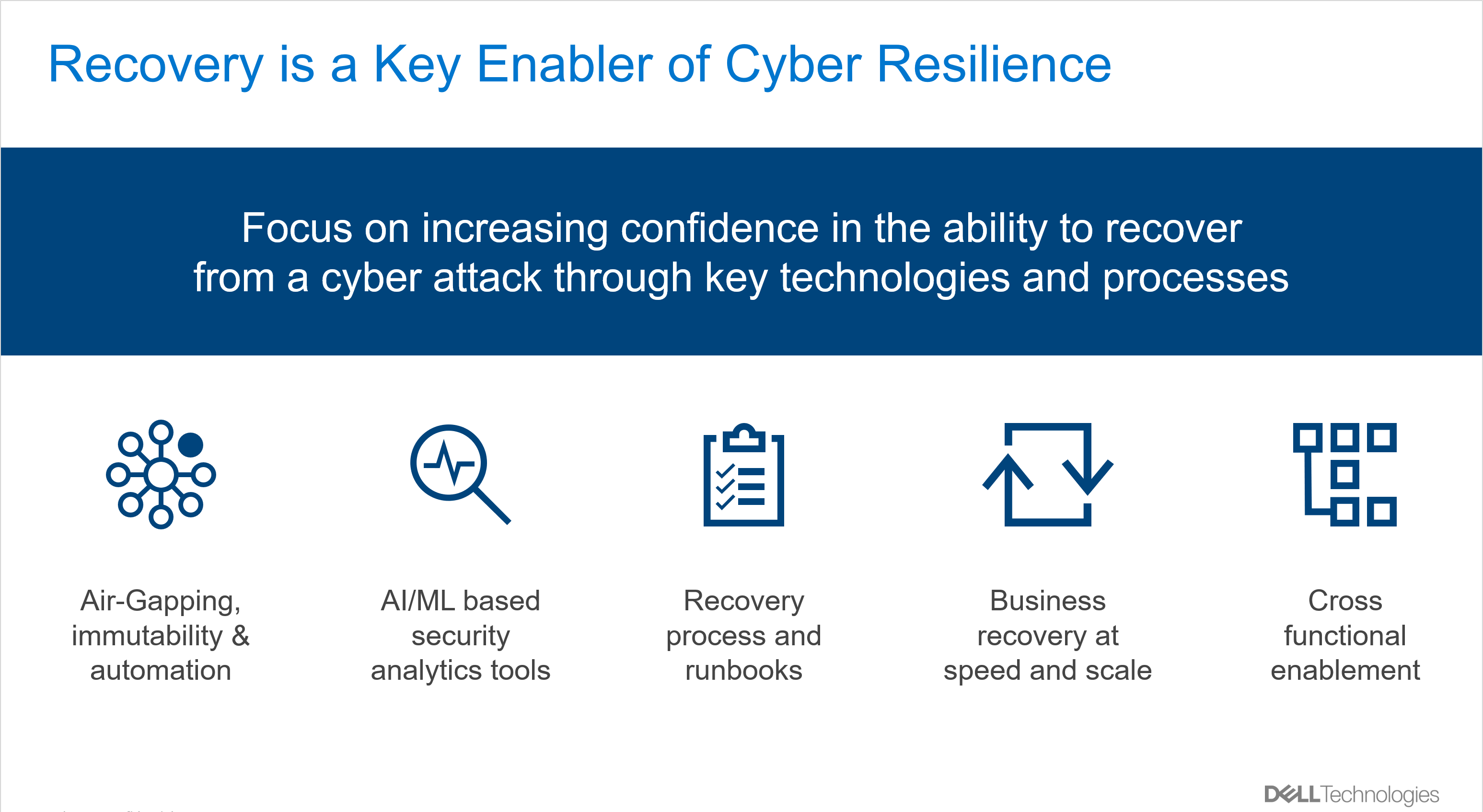
1. Organizations need to utilize technology purpose-built for recovering from a cyber-attack. The latest cyber recovery technologies are designed to address common threat vectors and create an effective cyber vault to protect enterprise data by creating isolation and additional hardening features, such as air-gapping and immutable storage, alongside automation to maintain process integrity and minimal user intervention.

2. Modern malware is a major challenge for organizations due to its sophisticated nature and intent to remain inconspicuous allowing the hackers to go unnoticed until they are ready to strike with force and cause widespread damage. They are known to leverage zero-day vulnerabilities to access and spread the infection, because its signature is not known, and it easily bypasses the traditional security defenses. Continuously analyzing data and analyze behavioral patterns using AI/ML based security analytics tools increases the likelihood of finding indicators of compromise and take proactive action to neutralize the infection before an attack is launched.

3. Developing a recovery processes is critical in operationalizing cyber recovery technologies and being ready for a recovery effort. This process must be tied tightly to recovering the most critical data first and should be documented in a runbook to ensure repeatability. Without careful planning and runbooks, most organizations may not survive a major interruption to the operation of their business, regardless of how mature their technology implementations are. Developing a recovery runbook also acts as a forcing function to identify gaps in current recovery process, people and skills.

4. To deliver business recovery at speed and scale, it’s imperative to mature the cyber recovery program of the organization, tightly aligning recovery procedures with the criticality of specific business processes or application to normal business operations. This enables the core functions of the business to get back up and running as quickly as possible. This is usually a challenging effort because it relies on a deeper understanding of interdependencies of applications and respective data, configuration management and availability of infrastructure resources. While individual application recovery is achievable through runbooks, we find that incorporating an automation strategy is critical for mass recovery. In the case of cyber it is especially important due to the iterative nature of recovery which includes initial recovery, performing forensics and damage assessment and remediation before data can be returned to production.

5. Full cross-functional enablement of the recovery capability further integrates with organization-wide incident response plans and ensures complete adoption and readiness to execute a recovery. Security and business continuity are a shared responsibility and during widespread cyber-attack where applications, network, systems data are compromised, it requires a cross-functional organization to participate in the recovery efforts.


We’re also seeing many customers interested in having some of their cyber resilience initiatives managed for them to reduce risk and improve security operations. A centralized security operation streamlines threat intelligence, detection and response services. In addition to providing 24×7 operations, MSSPs have a wider view of global cyber threats landscape and bring unique insights. Organizations can redirect their resources that have deep institutional knowledge to high value business recovery operations while the provider can help with incident response, coordination and infrastructure recovery.

Integration of these critical technologies and processes enable organizations build their cyber resilience by knowing they have a “last line of defense” and can recover, should they fall victim to an attack.

HOW TO START A CYBER RECOVERY STRATEGY:

There are a few different activities which are great places to start in building your recovery strategy. One is to conduct a current state analysis to establish a baseline and determine areas to invest in. There are a few ways to achieve this, which include a program maturity analysis or a Business Impact Analysis. Both provide different analyses but will help identify specific activities to prioritize.

Another great place to start is with a well-known industry framework to ensure you’re properly evaluating and designing your cyber recovery plans. The NIST Cybersecurity Framework is one that’s been chosen by many organizations because its holistic view and in-depth recommendations.

Author: Arun Krishnamoorthy, Global Strategy Lead for Resiliency and Security, Dell Technologies

Source: https://www.dell.com/en-us/blog/cyber-resilience-5-core-elements-of-a-mature-cyber-recovery-program/

FOR A FREE CONSULTATION, PLEASE CONTACT US

Co-operative Bank reduces its operational costs by implementing Datacenter Modernisation

The Challenge

This cooperative bank not only have 58 branches, but also boasts of having its own data center. Given the sensitive nature of its business, it was very important for the bank to maximize the uptime of its core banking applications and lower the RPO and RTO in the eventuality of a disaster.

Some of the other challenges were as follows:


  • The equipment at the bank’s data center i.e., storage, networking, and servers, was aging and posed a security risk to the bank. It was due for a tech refresh
  • The anti-virus solution was outdated and needed to be upgraded
  • There was a lack of structured cabling, hence troubleshooting time was very high.
  • Backups were done manually with no automated backup facility. There was an urgent need for an automated backup solution
  • Non-existence of a Disaster Recovery (DR) site
  • The firewall rules were not properly configured, which made them prone to a cyberattack
  • Inadequate Business Continuity Planning (BCP)

The Solution

The bank’s evaluation criteria for the selection of a suitable vendor for tech modernization were stringent.  It wanted solutions vendors who were established, and well-known in the market. Competitively priced, the vendors needed to have experience in HCI and the necessary prowess in providing cutting-edge tech services. Sustainability and present market share was also factored in while shortlisting the vendor. The technical team was insistent on the selection of a vendor that had previously implemented the HCI solution for at least two customers in the banking sector. A detailed technical presentation was required from the SIs before they could submit their commercial tenders. A decision was taken in favor of an HCI solution, moving from the erstwhile 3-tier architecture. The reasons for this were many — easy operation, high performance, flexibility in maintenance, and working from a single pane of glass (compute, storage, and network).

The Benefits

Galaxy provided consulting services to the bank to help modernize its data center and its operations with the latest cutting-edge technologies to achieve its IT and financial goals. Highly skilled teams were provided for networking, operations, and security..

Some of the main benefits accruing from the new solution and highlighted by the bank are:

  1. Lenovo Nutanix helped achieve a highly available and scalable compute and storage solution
  2. Bank applications are now protected with local backup copies and secondary DR replicated copy
  3. One-click DR operations (applications can run from the DR Site in no time)
  4. High security with core and perimeter firewall
  5. Improved performance of the applications with the help of an application load balancer
  6. Secured web applications with WAF
  7. Structure network cabling which helps to identify issues quickly
  8. Reduced data center management operational cost
  9. The potential of achieving the ROI within three years
  10. Reduced incidences of an outage with a better customer experience
  11. Reduced time to the market owing to single-click application flow
  12. Better security compliance with this new next-generation setup

To know more about the solution